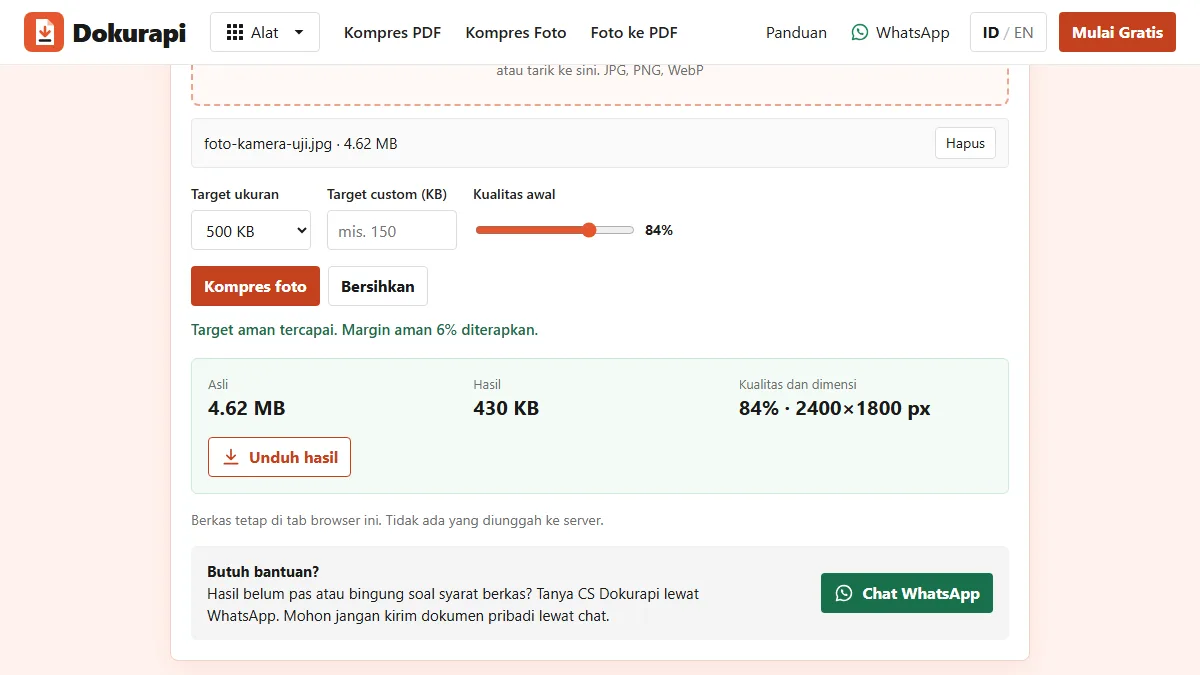
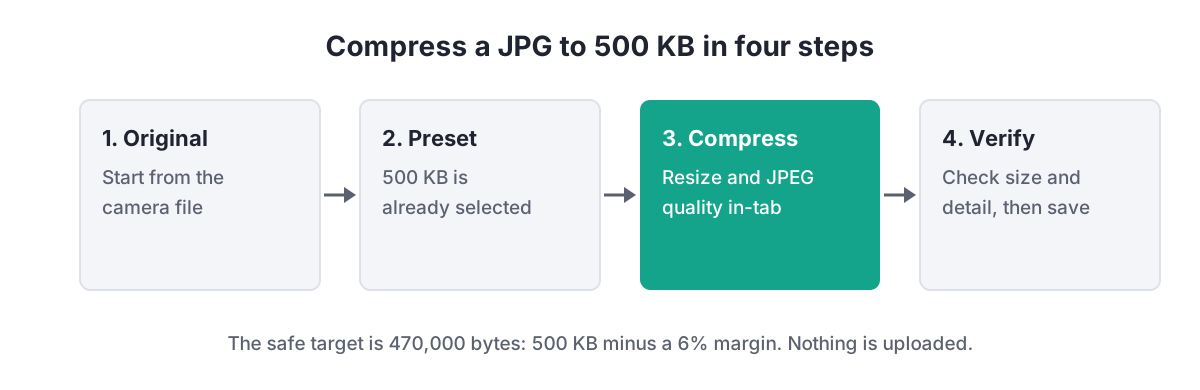
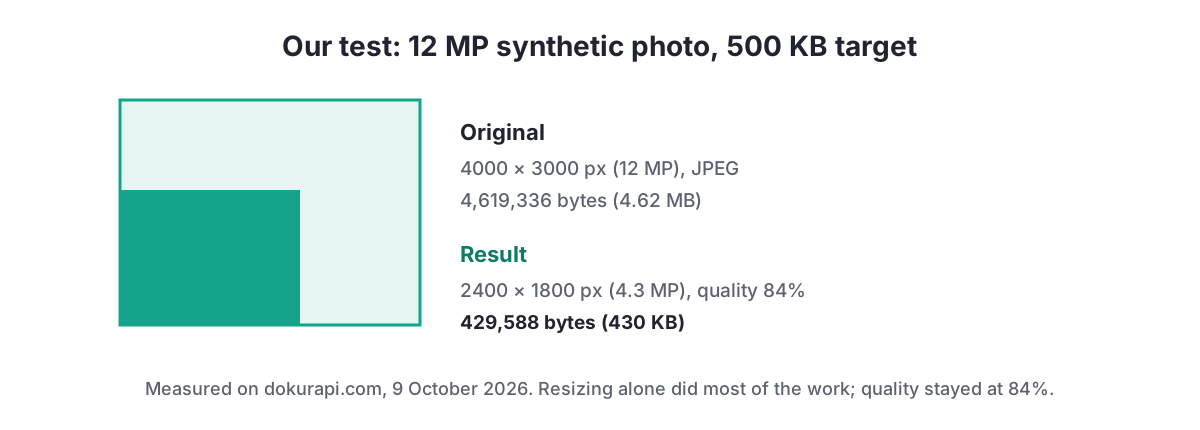
To compress JPG to 500KB, open Dokurapi's Compress Photo to 500 KB tool, choose your photo, keep the 500 KB preset, press Compress photo, and check the size and detail before you download. The tool aims for 470,000 bytes so the file passes however a portal counts kilobytes. In our test, a 4000 by 3000 pixel camera-style JPG of 4.62 MB came out at 429,588 bytes, still at 84% quality, because resizing to 2400 pixels did most of the work. Nothing is uploaded.
500 KB sounds roomy next to the 100 KB and 200 KB limits on many exam forms, and for a passport-style photo it is. The difficulty comes from modern phones: a straight-from-camera photo is often several megabytes and 12 megapixels or more. This guide explains what has to give to fit such a photo under 500 KB, and how to make sure it is the right thing.
How to compress a JPG to 500 KB
- Start from the original. A photo that has already passed through a chat app has been compressed once, and compressing it again makes blocky edges more visible.
- Open the 500 KB tool and choose the file. JPG, PNG and WebP are accepted, one image per run.
- Leave the starting quality at 84% unless you have a reason to change it. The tool lowers it only if needed.
- Press Compress photo. The status line says whether the safe target was reached.
- Read the result panel. It shows the original size, the output size, and the final quality and pixel dimensions.
- Zoom in before downloading. Check faces, signatures and any printed text, then save the JPG.
Ready to try it? The tool is free and runs in your browser.
Open the Compress Photo to 500 KB toolWhy the target is 470,000 bytes
Dokurapi treats 1 KB as 1,000 bytes, the SI meaning that NIST describes for the prefix kilo. Some software counts 1 KB as 1,024 bytes instead and still writes "KB", so "500 KB" on a form could mean 500,000 or 512,000 bytes. A 6% margin on every target removes the question: 500 KB becomes 470,000 bytes, which is under both.
That margin is useful with a real example. The 2022 LPDP scholarship user manual, an official LPDP document, set a maximum of 512 KB for the 4x6 profile photo at account registration. A file from the 500 KB tool, at no more than 470,000 bytes, sits comfortably under that historical limit. Treat it as a dated example: always read the current instructions for your own application, as explained in our LPDP upload guide.
| Form says | If counted in 1,000s | If counted in 1,024s | Dokurapi aims for |
|---|---|---|---|
| 200 KB | 200,000 bytes | 204,800 bytes | 188,000 bytes |
| 500 KB | 500,000 bytes | 512,000 bytes | 470,000 bytes |
| 1 MB | 1,000,000 bytes | 1,048,576 bytes | 940,000 bytes |
What the tool changes, in order
The 500 KB photo tool works through four moves and stops as soon as the file fits. First it caps the longest side at 2400 pixels; smaller photos keep their size. Second, it saves the picture as JPEG at the starting quality, 84% by default, using the browser's canvas encoder. Third, if the file is still above 470,000 bytes, it lowers the quality by 10 points at a time, up to seven times and never below 18%. Fourth, only if that is still not enough, it shrinks the dimensions step by step, never below 640 pixels on the longest side.
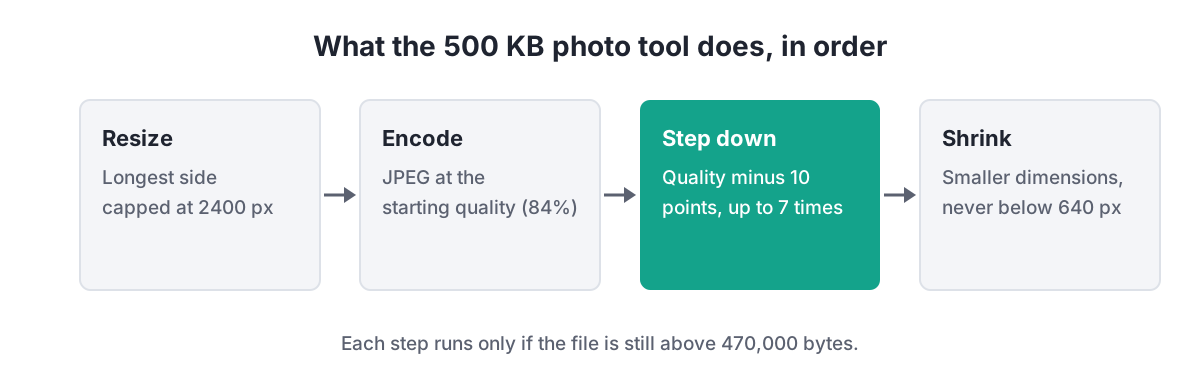
The order matters. Pixel count drives file size more than anything else, and 2400 pixels on the long side is still more than enough for a form photo or a document picture viewed on screen. Cutting pixels first means quality can often stay high. One detail to know: transparent areas in a PNG become white, because JPEG has no transparency.
Two test photos, two very different results
We tested the live tool on 9 October 2026 with two synthetic images, so no one's personal photo was involved. The first imitates an ordinary outdoor camera shot: 4000 by 3000 pixels (12 megapixels), smooth sky, textured ground, mild sensor noise. The second is deliberately hard: the same size, but covered in fine pattern and heavy noise, the kind of detail that JPEG struggles with.
| Test photo | Original | Output | Final quality | Final dimensions |
|---|---|---|---|---|
| Ordinary camera shot | 4,619,336 bytes, 4000 x 3000 | 429,588 bytes | 84% | 2400 x 1800 |
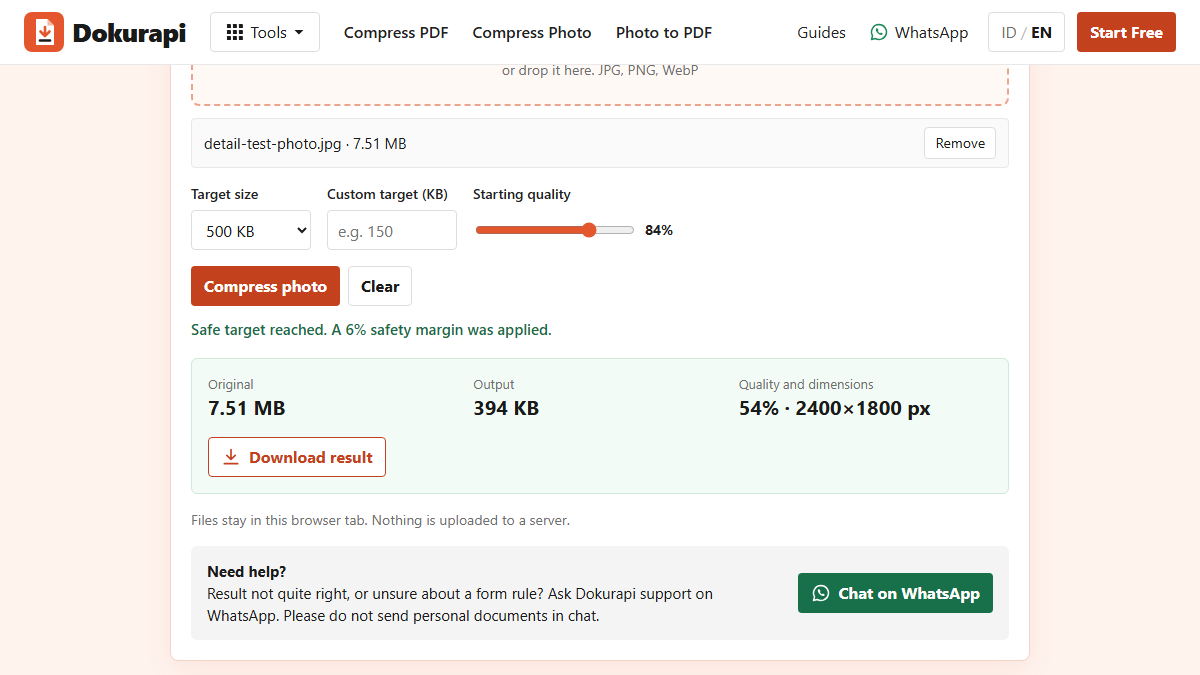
| High-detail, noisy image | 7,510,227 bytes, 4000 x 3000 | 393,740 bytes | 54% | 2400 x 1800 |
Both reached the safe target within about a second. The ordinary shot only needed the resize: going from 12 megapixels to about 4.3 megapixels was enough, and quality never moved from 84%. The noisy image needed three quality steps, from 84% down to 54%, before it fitted. Neither needed the final shrink step. Your photo will usually behave like the first one; scans of patterned paper or photos taken in low light behave more like the second.
Reading the result panel
After each run the tool shows three numbers. Original is the size of the file you picked. Output is the size of the new JPG, rounded for display; the downloaded file is what counts, and you can confirm its exact bytes with your file manager or our size checker. Quality and dimensions tells you how much the tool had to give up: if it still reads 84% and the dimensions are 2400 pixels on the long side, only the resize was needed and the photo is in good shape.
A quality figure in the 50s or 60s is not automatically a problem, but it is a signal to zoom in. Look at edges, hair, and small printed text, where JPEG artefacts appear first. If the status line says the safe target was not reached, the photo has hit the 640-pixel floor and is still too big, which almost always means extreme noise or a very busy scene. Retaking the photo in better light usually fixes it faster than changing settings.
Photographing documents for a 500 KB JPG
Many 500 KB fields are for documents photographed with a phone rather than portraits. Place the page flat on a plain, contrasting surface, hold the phone parallel to the paper, and use daylight or an even room light without a flash glare. Crop to the paper edge. A clean document photo compresses very well: large white areas cost almost nothing, so the bytes go to the text.
How to keep detail at 500 KB
If the result looks soft, the cause is usually noise or clutter in the original rather than the tool. Retake the photo in good light; low light makes the camera add grain, and grain is expensive to store. Crop away what the form does not need, such as the room around a document or the desk around a certificate. A tighter crop keeps more pixels on the part that matters.
Avoid compressing the same file repeatedly. Each JPEG save throws away a little more information, so always go back to the original instead of compressing an already compressed copy. If the form allows 1 MB, use the 1 MB photo tool and keep even more detail. If it needs less, our guides to compressing a JPG to 200 KB and compressing an image to 100 KB explain the tighter trade-offs.
Does the form want a JPG or a PDF?
Read the field label carefully. A field that asks for a scanned certificate as PDF will reject a JPG, however small. In that case convert the image with photo to PDF and then check the size, or use the PDF presets such as compress PDF to 500 KB. For red or blue background ID photos, prepare the background first with the red background photo guide, then compress the finished image.
Before submitting, confirm the exact byte count with the steps in check file size before upload. The size your phone shows may be rounded or counted in 1,024s.
Your photo stays on your device
Photos sent to forms are often faces, ID cards and signatures. The 500 KB tool decodes, resizes and re-encodes the image inside the browser tab and hands back a download. There is no upload, and you can verify that yourself with the method in how browser-based file tools work. The tool does not judge whether a photo meets a portal's rules on pose, background or recency; it only handles size.
Before you upload
- The output is under 470,000 bytes, or under the exact limit stated on the form.
- The file type matches the field: JPG for photos, PDF where a document is requested.
- Faces, signatures and printed text look sharp at 100% zoom.
- The photo was compressed once, from the original.
- You kept the original in case the portal asks for a larger version.
Frequently asked questions
How do I compress a JPG to 500 KB?
Why is my 500 KB result smaller than 500 KB?
Does compressing to 500 KB reduce the resolution?
Why did my photo end up at a lower quality?
Can I compress a PNG to a 500 KB JPG?
Is my photo uploaded anywhere?
Will a 500 KB photo be accepted by the portal?
Sources
- NIST: Prefixes for binary multiples
- MDN: HTMLCanvasElement.toBlob() and the quality parameter
- LPDP: User Manual Pendaftaran Beasiswa 2022 (profile photo max 512 KB)
Need help?Result not quite right, or unsure about a form rule? Ask Dokurapi support on WhatsApp. Please do not send personal documents in chat.
Chat on WhatsApp