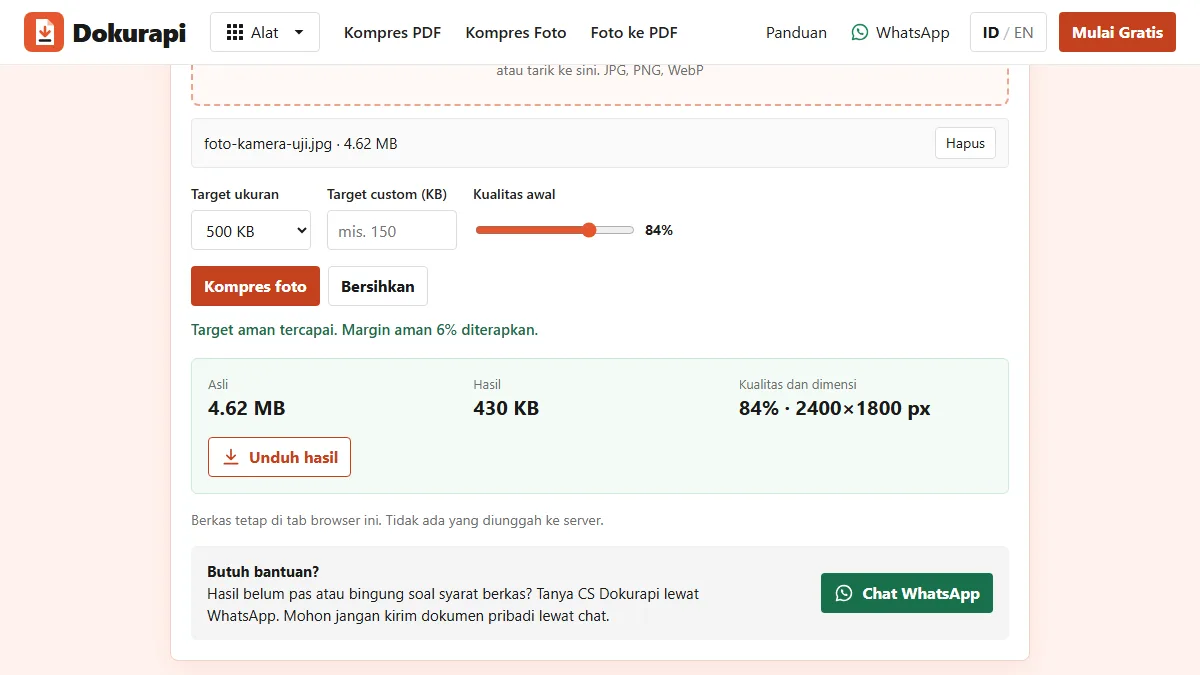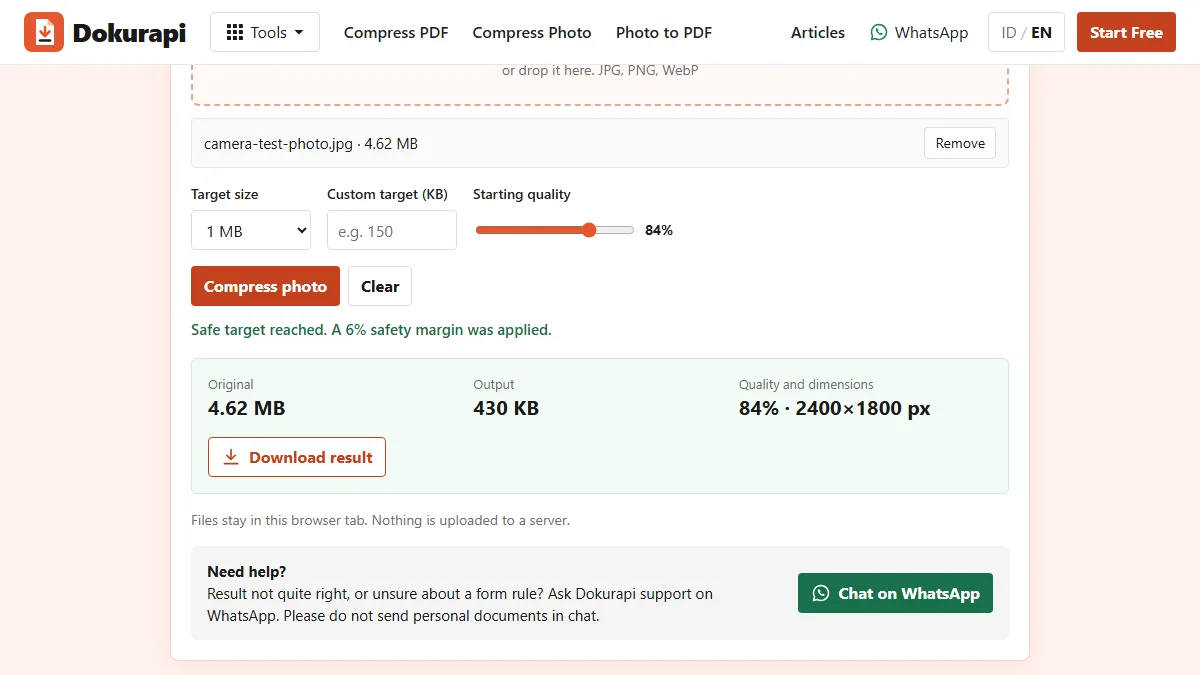
To compress JPG to 1MB, open Dokurapi's Compress Photo to 1 MB tool, choose your photo, keep the 1 MB preset, press Compress photo, then read the result panel and zoom in before you download. The tool aims for 940,000 bytes, so the file passes whether a form counts a megabyte as 1,000,000 or 1,048,576 bytes. In our tests a 4.62 MB, 12 megapixel camera-style JPG came out at 429,588 bytes and kept 84% quality. The photo never leaves your browser tab.
Compared with the 100 KB and 200 KB caps on many exam and job forms, 1 MB is generous. That changes the question. With a tight limit, the challenge is fitting the file at all. With 1 MB, the challenge is not throwing away detail you did not need to lose, and not making a file worse when it was already fine. This guide shows what the tool does, with numbers measured on the live site on 10 October 2026.
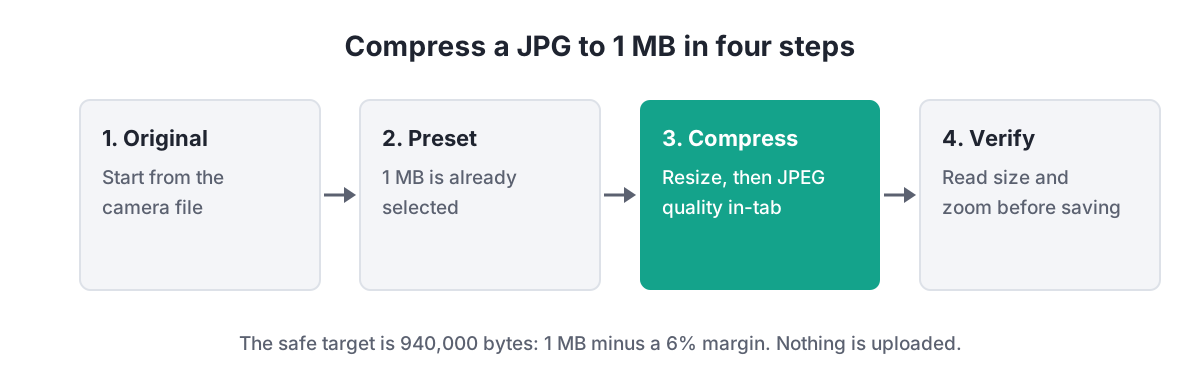
How to compress a JPG to 1 MB
- Start from the original file. A photo that has been sent through a chat app has already been compressed once, and each extra round adds blocky edges.
- Open the 1 MB tool and choose the photo. JPG, PNG and WebP are accepted, one image per run.
- Keep the starting quality at 84% unless you have a reason to change it. The tool only lowers it when the file does not fit.
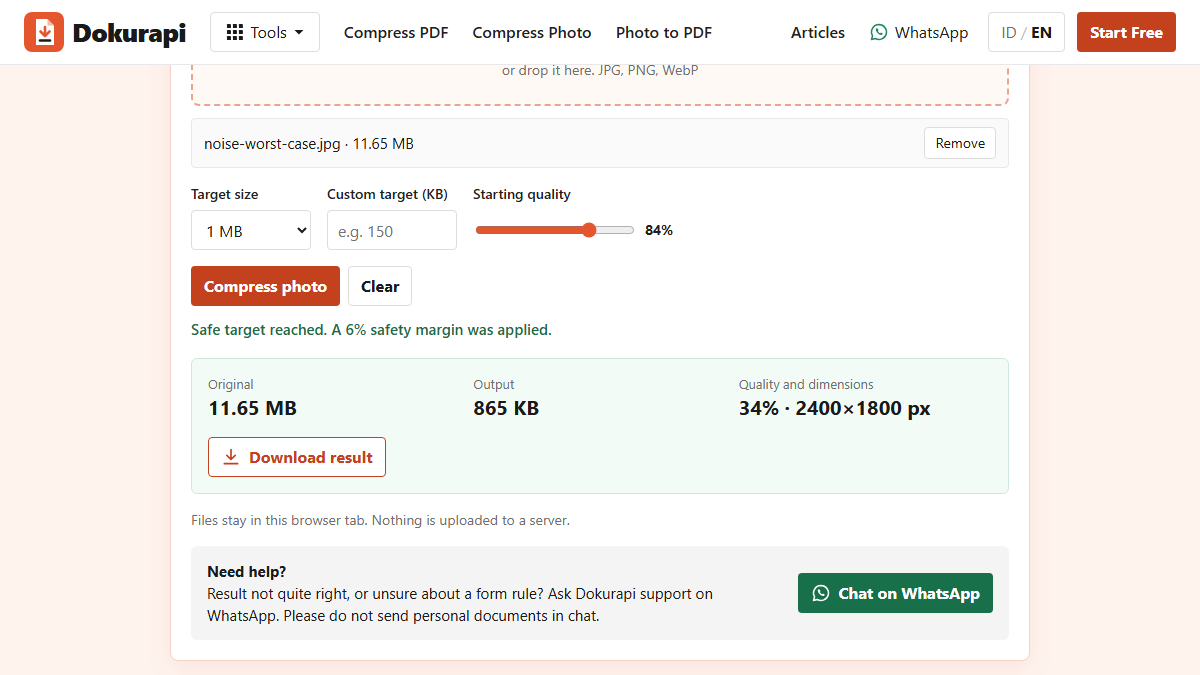
- Press Compress photo. The status line tells you whether the safe target was reached.
- Read the result panel. It lists the original size, the output size, the final JPEG quality and the pixel dimensions.
- Zoom in, then download. Check faces, signatures and small print at 100% before you save the JPG.
Ready to try it? The tool is free and runs in your browser.
Open the Compress Photo to 1 MB toolWhy the target is 940,000 bytes
"1 MB" is not one fixed number. In the SI system that NIST describes, mega means one million, so 1 MB is 1,000,000 bytes. Many operating systems and older upload scripts still count in powers of two and call 1,048,576 bytes "1 MB". A file that one program reports as 0.99 MB can therefore be just over the limit in another.
Dokurapi removes that doubt with a 6% margin on every target. For the 1 MB preset the tool aims for at most 940,000 bytes, which is under both readings with room to spare. The same rule gives 470,000 bytes for 500 KB and 188,000 bytes for 200 KB. If you type a custom target in KB, the same 6% margin is applied to your number.
| Form says | Counted in 1,000s | Counted in 1,024s | Dokurapi aims for |
|---|---|---|---|
| 200 KB | 200,000 bytes | 204,800 bytes | 188,000 bytes |
| 500 KB | 500,000 bytes | 512,000 bytes | 470,000 bytes |
| 1 MB | 1,000,000 bytes | 1,048,576 bytes | 940,000 bytes |
| 2 MB | 2,000,000 bytes | 2,097,152 bytes | 1,880,000 bytes |
One practical consequence: the result will usually look smaller than the limit, sometimes much smaller. That is expected, and the next sections explain why.
What the tool changes, in order
The photo tools on Dokurapi share one routine, and the 1 MB preset only changes the target. The routine has four moves and stops as soon as the file fits. First, it caps the longest side at 2400 pixels; a photo that is already smaller keeps its size. Second, it saves the picture as JPEG at the starting quality, 84% by default, using the browser's own canvas encoder. Third, if the result is still above 940,000 bytes, it lowers the quality by 10 points at a time, at most seven times and never below 18%. Fourth, only if that is still not enough, it shrinks the dimensions step by step, never below 640 pixels on the longest side.
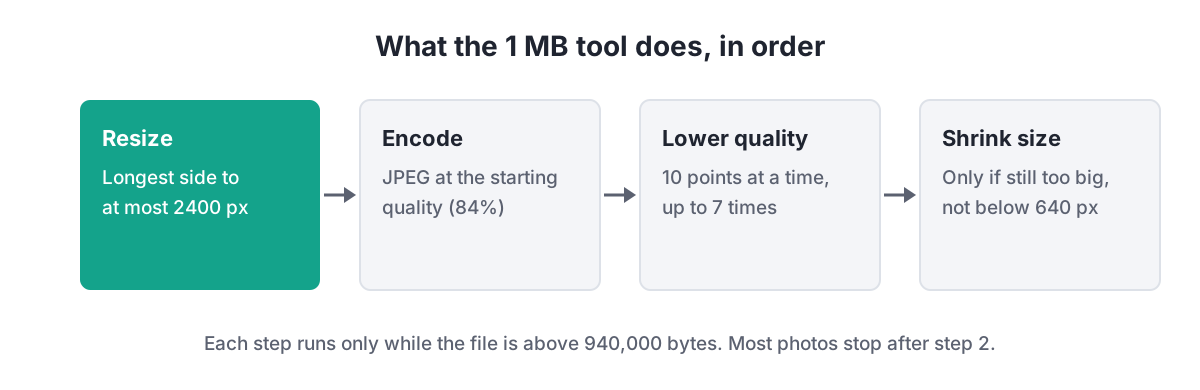
The resize step matters most. Pixel count drives file size more than anything else, and 2400 pixels on the long side is still sharp on a laptop screen and more than enough for a form photo. Because the resize always runs on large photos, even with a generous 1 MB target, the output of a 12 megapixel camera shot will be around 4.3 megapixels whichever photo preset you choose.
Five test files and what happened
We ran five synthetic images through the live 1 MB tool on 10 October 2026, so no real person's photo was involved. They cover the cases people actually meet: an ordinary 12 megapixel outdoor shot, a 12 megapixel image full of fine detail, a 24 megapixel detailed image, a worst case made of pure random noise, and a small 1600 by 1200 photo that was already under the limit.
| Test file | Original | Output | Final quality | Final pixels |
|---|---|---|---|---|
| Camera-style, 12 MP | 4,619,336 bytes | 429,588 bytes | 84% | 2400 × 1800 |
| Fine detail, 12 MP | 7,510,227 bytes | 665,336 bytes | 84% | 2400 × 1800 |
| Fine detail, 24 MP | 15,361,426 bytes | 786,206 bytes | 84% | 2400 × 1600 |
| Pure noise, 12 MP | 11,652,788 bytes | 865,395 bytes | 34% | 2400 × 1800 |
| Small photo | 288,497 bytes | 195,859 bytes | 84% | 1600 × 1200 |
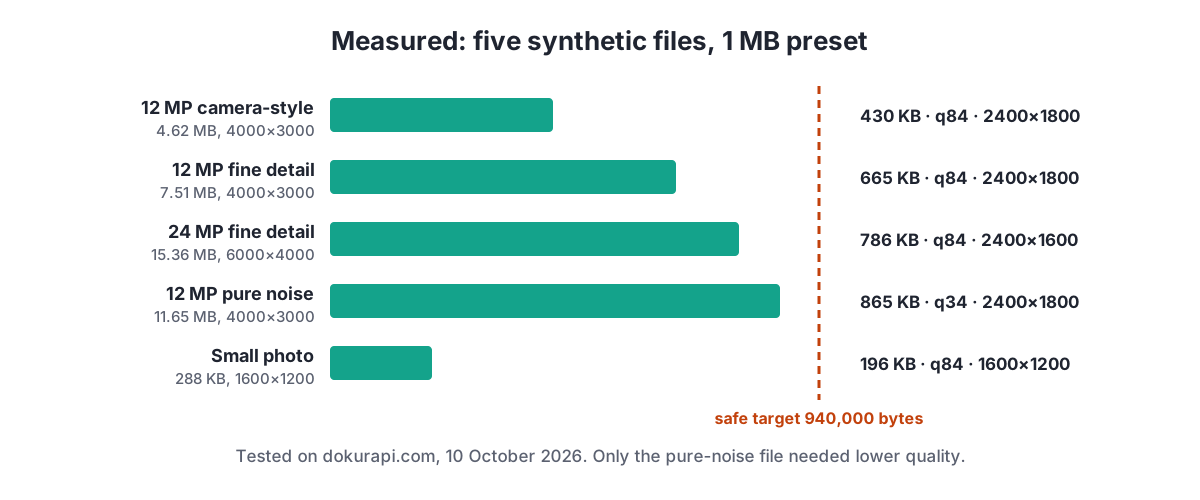
Four of the five files fitted on the very first JPEG save after the resize. Even the 15.36 MB, 24 megapixel image came out at 786,206 bytes without any quality reduction. In everyday use, then, a 1 MB target rarely forces a visible trade-off.
When quality has to drop
The pure-noise file is the exception, and it was built to be. Random noise has no smooth areas or repeated patterns, which are exactly what JPEG compression relies on. After the resize, the first save at 84% was still well above 940,000 bytes, so the tool stepped the quality down 10 points at a time: 74, 64, 54, 44 and finally 34%, where the file came in at 865,395 bytes. It never needed to shrink the dimensions.
Real photos only behave like this in extreme conditions: very high ISO night shots, gravel or foliage filling the whole frame, or heavily sharpened scans. If the result panel shows a quality well below 84% and the photo looks blotchy when you zoom in, try these fixes in order:
- Crop away the parts of the picture the form does not need, then compress again.
- Use a cleaner original, for example a photo taken in better light.
- If the form allows it, choose the 2 MB preset or a custom target instead.
If your photo is already under 1 MB
The tool always re-encodes the image, even when it is already below the target. Our 288,497 byte test photo came out at 195,859 bytes. That is smaller, but it is also a second round of JPEG compression on a file that was already compressed. The size did not need to change at all, because the form would have accepted the original.
So before you compress, check the size. On Windows, the file Properties window shows the exact byte count; on a phone, the file manager or gallery details usually do. If the number is below 1,000,000 bytes, and the form accepts JPG, you can upload the original. If you are unsure how a portal counts, our guide on checking file size before upload walks through it. Compress only when the file is over the limit, or when the form also sets a maximum pixel size that your photo exceeds.
The same thinking applies to screenshots and graphics saved as PNG. A simple PNG with flat colours can be very small, and converting it to JPEG may make it larger and blur the edges of text. Keep the PNG if the form accepts it and it is already under the limit.
1 MB, 500 KB or 200 KB: picking the right preset
Use the largest target the form allows. A bigger target leaves more room for detail, and the tool only removes what it must. If the instructions say "maximum 1 MB", there is no benefit in squeezing a photo to 200 KB first. The table below sums up when each photo preset fits best.
| Preset | Safe target | Typical use | Tool |
|---|---|---|---|
| 1 MB | 940,000 bytes | Document photos, proof-of-work images, forms with a generous cap | Photo to 1 MB |
| 500 KB | 470,000 bytes | Profile and registration photos | Photo to 500 KB |
| 200 KB | 188,000 bytes | Exam and recruitment pas foto | Photo to 200 KB |
| 100 KB | 94,000 bytes | Very strict forms, signatures | Photo to 100 KB |
For the details of the tighter presets, see our guides to compressing a JPG to 500 KB, compressing a photo to 200 KB and compressing a photo to 100 KB. Limits change between application cycles, so always read the current instructions on the official portal.
When the form wants a PDF, not a JPG
A 1 MB cap is common for document uploads, and many of those fields accept PDF only. The 2022 LPDP scholarship user manual, an official LPDP document, is a good example: every document had to be a PDF of at most 1 MB, while the profile photo was capped separately at 512 KB. Treat those figures as a dated example and check the current form, as our LPDP upload guide explains.
If you photographed a paper document, compressing the JPG is only half the job. Convert it with Photo to PDF, which our photo to PDF guide covers step by step. If the PDF is then too big, run it through Compress PDF to 1 MB, explained in the PDF to 1 MB guide. Several pages that belong together can be joined with Merge PDF before compressing, so the whole set is checked against the limit once.
Checklist before you upload
Run through these points once the download is saved. They take a minute and catch most rejected uploads.
- The file is JPG, and the form asks for JPG or JPEG rather than PDF.
- The size shown in the result panel is under 1 MB, and you opened the downloaded file to confirm it.
- The final quality in the result panel is close to 84%, or you zoomed in and the detail still reads clearly.
- Faces, signatures and printed text are sharp at 100% zoom.
- You kept the original file in case the portal asks for a larger or different version.
If a file still refuses to fit, our guide on what to do when a compressed file is still too big covers the next steps. And if you want to know why nothing is sent to a server during any of this, read how Dokurapi's browser tools work.
Frequently asked questions
How do I compress a JPG to 1 MB?
Why is my result much smaller than 1 MB?
Does compressing to 1 MB lower the quality?
Should I compress a photo that is already under 1 MB?
Why does Dokurapi aim for 940,000 bytes?
Can I compress a PNG or WebP to a 1 MB JPG?
Is my photo uploaded anywhere?
Will a 1 MB photo always be accepted by the portal?
Sources
- NIST: Prefixes for binary multiples
- MDN: HTMLCanvasElement.toBlob() and the quality parameter
- LPDP: User Manual Pendaftaran Beasiswa 2022 (documents max 1 MB, photo max 512 KB)
Need help?Result not quite right, or unsure about a form rule? Ask Dokurapi support on WhatsApp. Please do not send personal documents in chat.
Chat on WhatsApp