The standard 4x6 photo size is 4 x 6 inches, which is about 102 x 152 mm (10.2 x 15.2 cm), with a 2:3 aspect ratio. It is the classic photo print, also called 4R. To print it sharply at 300 dpi you need 1200 x 1800 pixels.
In Indonesia and a few other countries, "4x6" on a form usually means something much smaller: a 4 x 6 cm ID photo (40 x 60 mm). Both share the same 2:3 shape, so one crop works for both, and Dokurapi's ID photo tool produces that crop as a 600 x 900 pixel JPG.
This guide covers the 4x6 print in every unit, the pixels you need at common print resolutions, why photos from a phone have to be cropped to fit, how the 4x6 cm ID photo differs, how to make a 2:3 crop in your browser, how many photos fit on a sheet, and how to keep the file small enough for an upload portal.
4x6 photo size in inches, cm, mm and pixels
A 4x6 print is 4 inches on the short side and 6 inches on the long side. Since one inch is exactly 25.4 mm, that works out to 101.6 x 152.4 mm, usually rounded to 102 x 152 mm. Photo labs list the same print as 4R, and in metric countries it is often sold as 10 x 15 cm. The ratio is 4:6, which simplifies to 2:3 when held upright, or 3:2 when held sideways.
| Unit | 4x6 inch print (4R) | 4x6 cm ID photo |
|---|---|---|
| Inches | 4 x 6 in | 1.57 x 2.36 in |
| Millimetres | 101.6 x 152.4 mm | 40 x 60 mm |
| Centimetres | 10.16 x 15.24 cm | 4 x 6 cm |
| Aspect ratio | 2:3 (3:2 landscape) | 2:3 |
| Pixels at 300 dpi | 1200 x 1800 px | 472 x 709 px |
| Dokurapi tool output (4:6) | 600 x 900 px (150 dpi) | 600 x 900 px (about 381 dpi) |
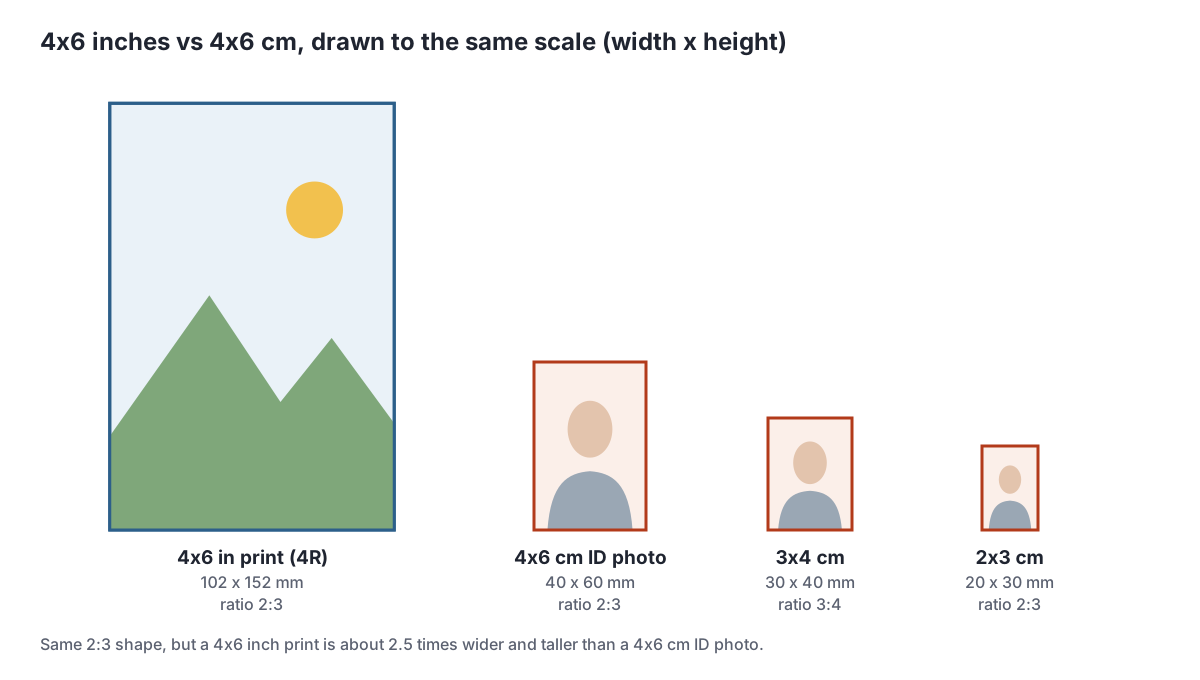
The right-hand column matters because the same three characters, "4x6", describe two very different sizes. If a photo lab, a visa office or an application form asks for a 4x6, check the unit. A 4x6 inch print is roughly two and a half times wider and taller than a 4x6 cm ID photo. The numbers are always width first, then height, so an upright 4x6 is 4 wide and 6 tall.
Ready to try it? The tool is free and runs in your browser.
Open the ID photo toolHow many pixels does a 4x6 print need?
Pixels have no physical size of their own. A print size appears only when you divide pixels by a print density, measured in dots per inch (dpi) or pixels per inch (ppi). For a 4x6 inch print the maths is easy: multiply each side in inches by the dpi. At 300 dpi you get 4 x 300 by 6 x 300, which is 1200 x 1800 pixels.
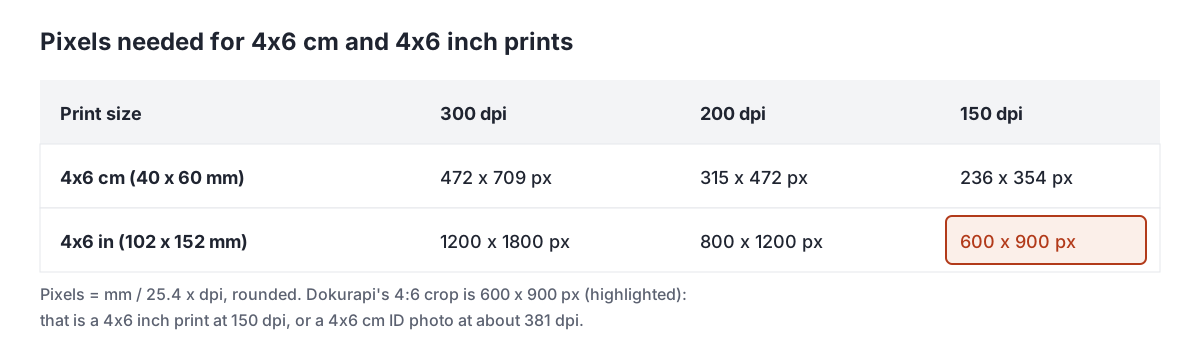
300 dpi is the usual target for photo prints you will hold in your hand. At 200 dpi (800 x 1200 pixels) most prints still look fine at arm's length, and 150 dpi (600 x 900 pixels) is acceptable for casual prints but can look soft up close. Any modern phone photo has far more pixels than 1200 x 1800, so the real question is usually the crop, not the resolution.
The dpi number stored inside a JPG does not change the pixels. As the Wikipedia article on dots per inch explains, a 1,000 x 1,000 pixel image set to 250 ppi prints at 4 x 4 inches, and changing the ppi setting only changes the intended print size. Labs and upload portals read the pixel count, so do not worry if one app reports 72 dpi and another 300 dpi for the same file.
Why a phone photo needs cropping for a 4x6
Many phone cameras shoot in 4:3 by default, while a 4x6 print is 3:2. The shapes do not match, so something has to go. Either the lab trims the edges, or the print gets white borders. Cropping yourself lets you choose what is lost.
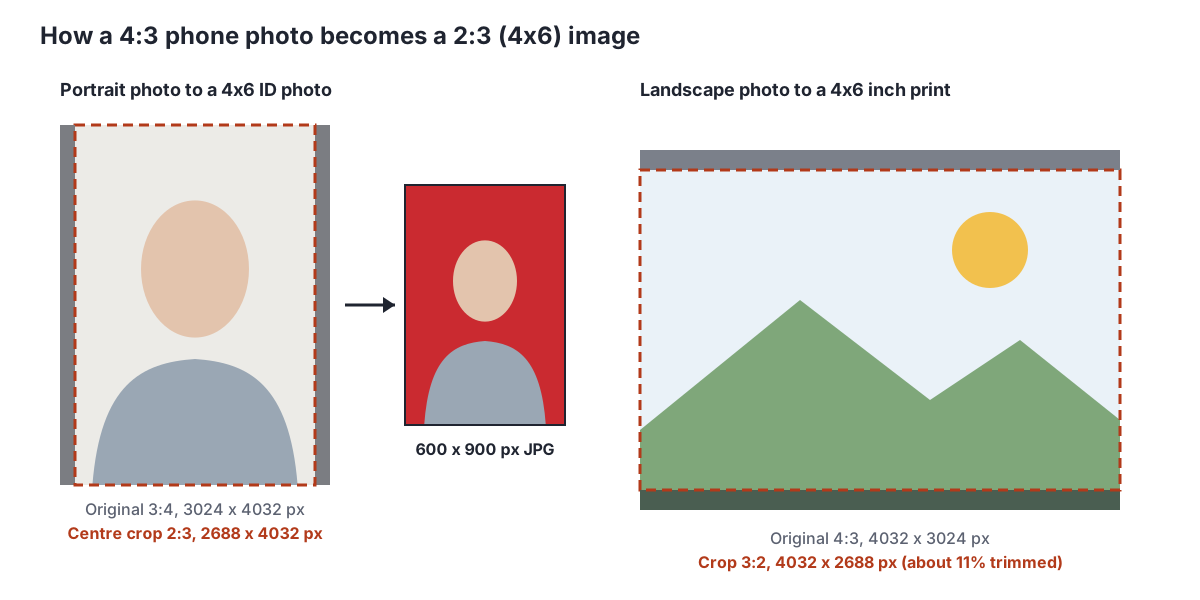
Take a landscape photo of 4032 x 3024 pixels. Keeping the full width, a 3:2 crop needs a height of 4032 / 1.5 = 2688 pixels, so 336 pixels (about 11%) are cut from the top and bottom. A portrait photo works the same way on its sides: 3024 x 4032 becomes 2688 x 4032. For a 16:9 photo such as 4032 x 2268, the crop goes the other way: the height stays and the width drops to 3402 pixels, trimming about 16% from the sides.
When you compose the shot, leave space around the subject so the trim does not cut off heads or feet. For ID photos, keep the face in the middle with room above the head and below the shoulders.
4x6 cm ID photos: same shape, much smaller
Outside the photo lab, "4x6" often refers to a passport-style photo of 4 x 6 cm. It is common on Indonesian application forms, alongside the 3x4 and 2x3 sizes. The comparison below is drawn to scale.
One documented example: the 2022 LPDP scholarship registration manual (page 5, item i) asked for a formal 4x6 cm photo showing the face to half body, with a file size of at most 512 KB. Newer LPDP manuals use different rules, summarised in our LPDP upload requirements guide. Rules change from year to year, so always follow the current announcement.
If you need the 3x4 cm format instead, its full size table and print counts are in our 3x4 photo size guide. When a form asks for both sizes, make two separate crops from the original photo rather than cropping one result into the other.
How to make a 4x6 (2:3) photo in your browser
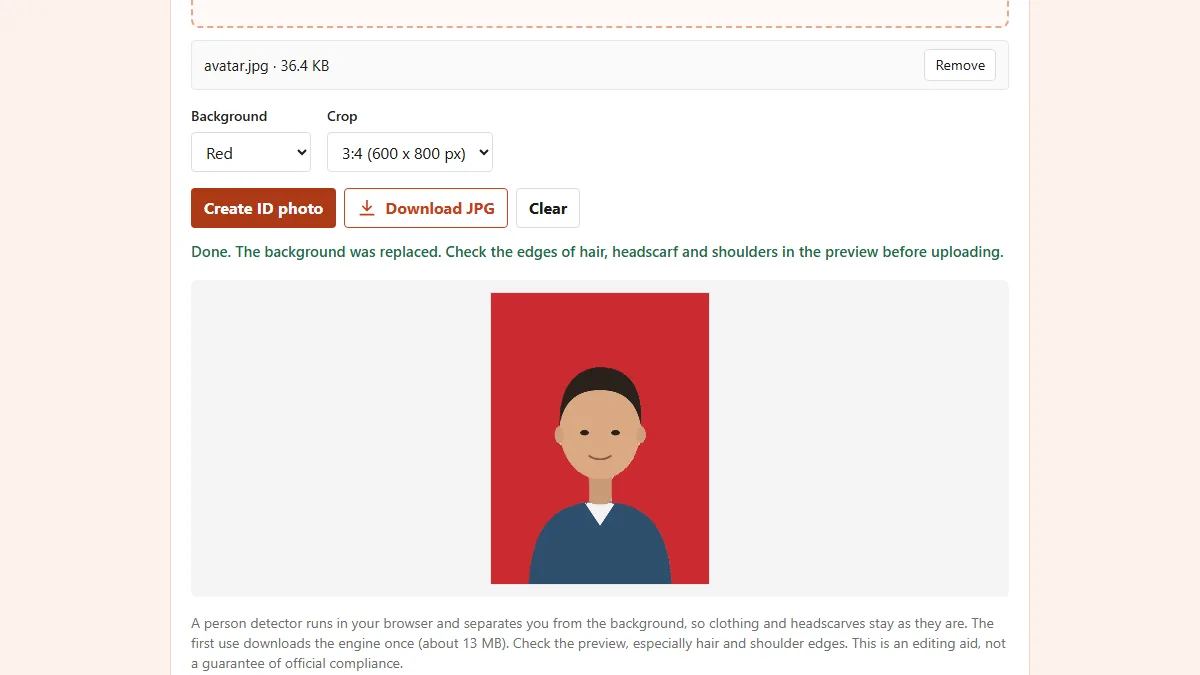
Dokurapi's ID photo tool crops to 4:6 and replaces the background with red or blue, all inside your browser tab. Nothing is uploaded to a server; how browser tools work explains the approach.
- Pick a front-facing photo against a plain background with even light, with the face in the centre of the frame.
- Open the tool for your colour: red background or blue background. You can switch colours later in the Background menu.
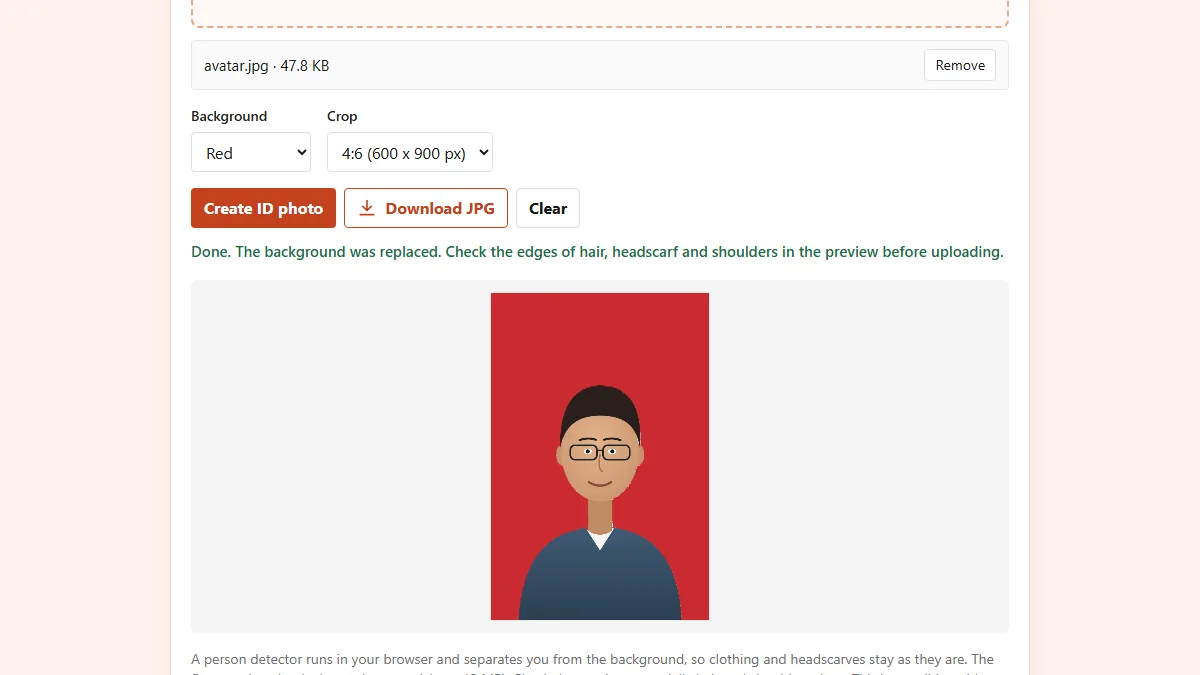
- Set Crop to 4:6 (600 x 900 px). The default is 3:4, so change it.
- Click Create ID photo. The first run downloads the background detector once, about 13 MB.
- Check the preview, especially hair, headscarf and shoulder edges, then click Download JPG. The file is named like
dokurapi-pasfoto-red-4x6.jpg.
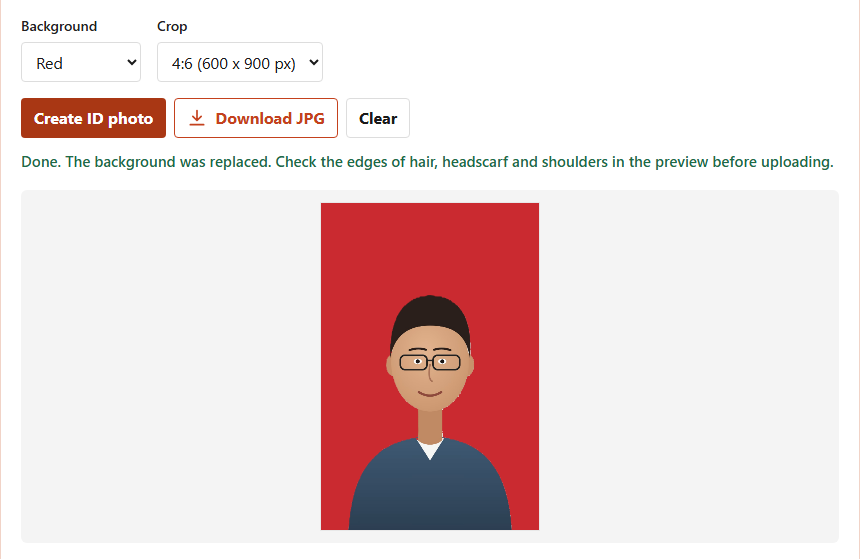
In our test with that illustration, the downloaded 600 x 900 pixel JPG was 24,683 bytes, about 24 KB. That size is ideal for a 4x6 cm ID photo. For a 4x6 inch print, 600 x 900 pixels gives only 150 dpi, so crop the full-resolution original to 3:2 in your gallery app instead. The tool is an editing aid, not a guarantee that an office will accept the photo.
Printing 4x6 cm photos on a 4x6 inch sheet or A4
If you need printed ID photos, a single 4x6 inch print can carry several of them, which is much cheaper than one print per photo. The count comes from dividing the paper by the photo size.
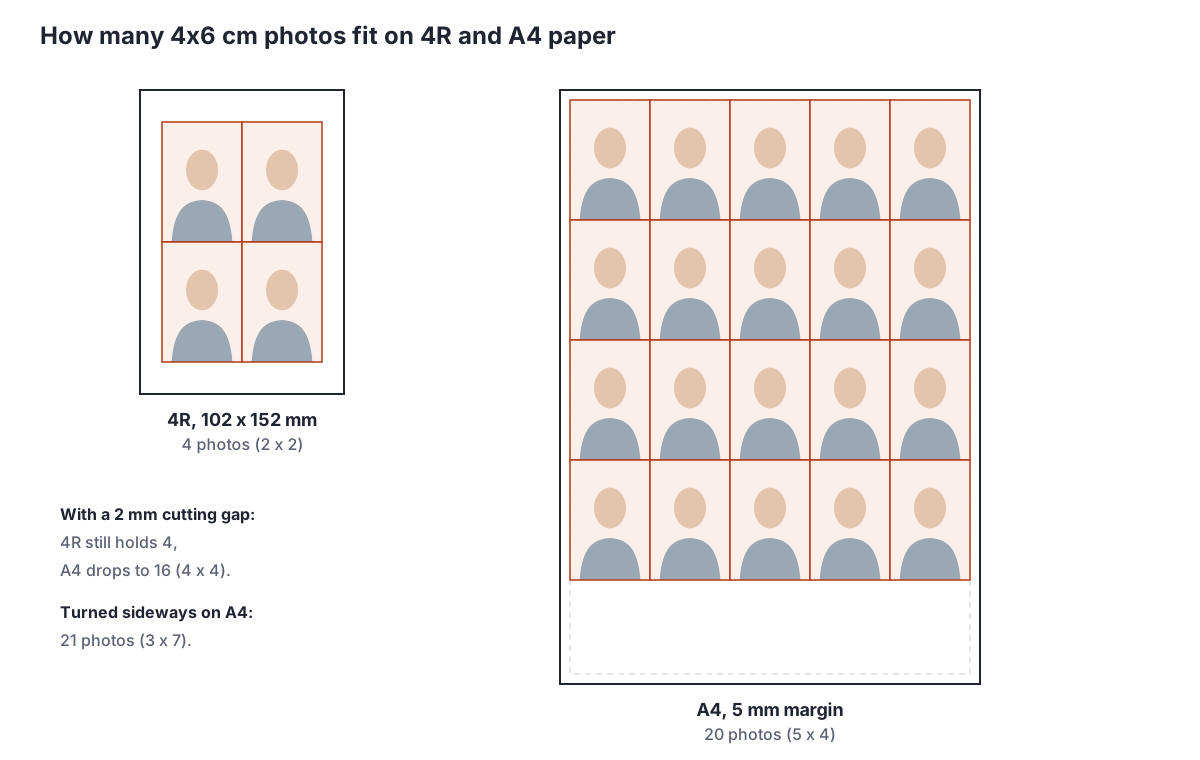
| Paper | Size | 4x6 cm photos | Notes |
|---|---|---|---|
| 4x6 in (4R) | 102 x 152 mm | 4 (2 x 2) | Still 4 with a 2 mm gap |
| A4, 5 mm margin | 210 x 297 mm | 20 (5 x 4) | 47 mm spare at the bottom |
| A4, turned sideways | 210 x 297 mm | 21 (3 x 7) | Photos print rotated |
| A4, 2 mm cutting gap | 210 x 297 mm | 16 (4 x 4) | Easiest to cut cleanly |
Print at 100% scale or "actual size", never "fit to page", which can resize the photos. Print one test sheet, measure it with a ruler, then print the rest. To arrange several photos into one file for a print shop, use photo to PDF.
Red or blue background for a 4x6 ID photo
The size does not decide the background colour; the institution does. Red and blue are the two colours most often requested on Indonesian forms. The tool uses fixed values from its code: red is RGB 202, 42, 48 and blue is RGB 35, 87, 159.
- For red, start from the red background tool and read the red background ID photo guide.
- For blue, use the blue background tool and see the blue background ID photo guide.
If an announcement asks for another colour, such as white, this tool does not offer it yet. Avoid clothing in the same colour as the background, because shoulder edges blend in once printed. Changing the colour never changes the size; the output stays 600 x 900 pixels at 2:3. If the announcement shows a sample photo, match its framing too: how much space sits above the head and where the shoulders end. Those details are easy to get right while shooting and hard to fix afterwards.
File size limits for 4x6 photo uploads
Upload portals almost always cap the file size in KB or MB. Common limits are 100 KB, 200 KB, 500 KB and 1 MB. A 600 x 900 pixel JPG of a real face is usually tens of KB to a few hundred KB, depending on detail.
- 100 KB limit: compress image to 100 KB.
- 200 KB limit: compress image to 200 KB. Unsure how 200 KB compares to MB? See 200 KB to MB.
- 500 KB limit: compress image to 500 KB.
- Any other limit: compress image with a custom target.
Dokurapi's compressors apply a 6% safety margin, so a 200 KB target is aimed at about 188 KB to survive differences in how KB is counted. Compress after cropping and changing the background, not before, so the photo is not compressed twice. A walkthrough is in compress a photo to 200 KB, and the check file size before upload checklist helps before you submit a full set.
Common 4x6 photo mistakes
Most 4x6 problems come from small slips rather than wrong numbers.
- Mixing up inches and centimetres. Ask a lab for "4x6" and you get a 4x6 inch print. Say "4x6 cm ID photo" if that is what you need.
- Forgetting to switch the crop. The tool defaults to 3:4. If you forget, you get 600 x 800 pixels instead of 600 x 900.
- Stretching instead of cropping. Forcing a 4:3 photo into a 2:3 frame makes faces look thin. Always crop.
- Off-centre subject. Centre crops cut off whatever sits near the edge.
- Printing with fit to page. The result is no longer 4 x 6 of anything. Use 100% scale.
- Expecting a 600 x 900 file to make a crisp 4R print. It prints at 150 dpi. Use the original for prints.
If a portal rejects your photo, read the message closely. "Invalid dimensions" points to the ratio or pixel count, while "file too large" points to KB. The first needs a new crop, the second needs compression. Keep the full-resolution original in a separate folder so you can make a fresh crop at any size without reshooting.
Frequently asked questions
What is the 4x6 photo size in cm and mm?
How many pixels is a 4x6 photo?
What aspect ratio is a 4x6 photo?
Is 4R the same as 4x6?
Is a 4x6 photo the same as a 4x6 cm passport photo?
How many 4x6 cm ID photos fit on a 4x6 inch print?
How do I make a 4x6 ID photo without an app?
Is my photo uploaded when I use the Dokurapi ID photo tool?
Sources
- Photo print sizes (4R = 4 x 6 in, 102 x 152 mm, ratio 3:2), Wikipedia
- Inch (1 inch = 25.4 mm), Wikipedia
- Dots per inch (PPI sets print size, not pixel count), Wikipedia
- Paper size (A4 210 x 297 mm), Wikipedia
- LPDP Registration User Manual 2022, page 5 item i (4x6 cm formal photo, max 512 KB)
Need help?Result not quite right, or unsure about a form rule? Ask Dokurapi support on WhatsApp. Please do not send personal documents in chat.
Chat on WhatsApp