A photo for a job application is usually a passport-style head-and-shoulders photo, most often 3x4 cm (30 x 40 mm) or 4x6 cm (40 x 60 mm), sent as a JPG under a file size limit set by the employer. For online applications, what matters is the pixel size, the format and the size in KB, not the centimetres. This guide gives the cm, mm and pixel numbers, background colour choices, how to make the photo in your browser, and how to shrink the file below the limit in the job posting.
One rule before anything else: there is no single official size that every employer uses. Whether a photo is expected at all depends on the country, the sector and the employer. Some postings ask for one, many do not. Use the numbers below as a general reference and always match them against the posting you are applying to.
Photo sizes for a job application: 3x4, 4x6 and 2x3 cm
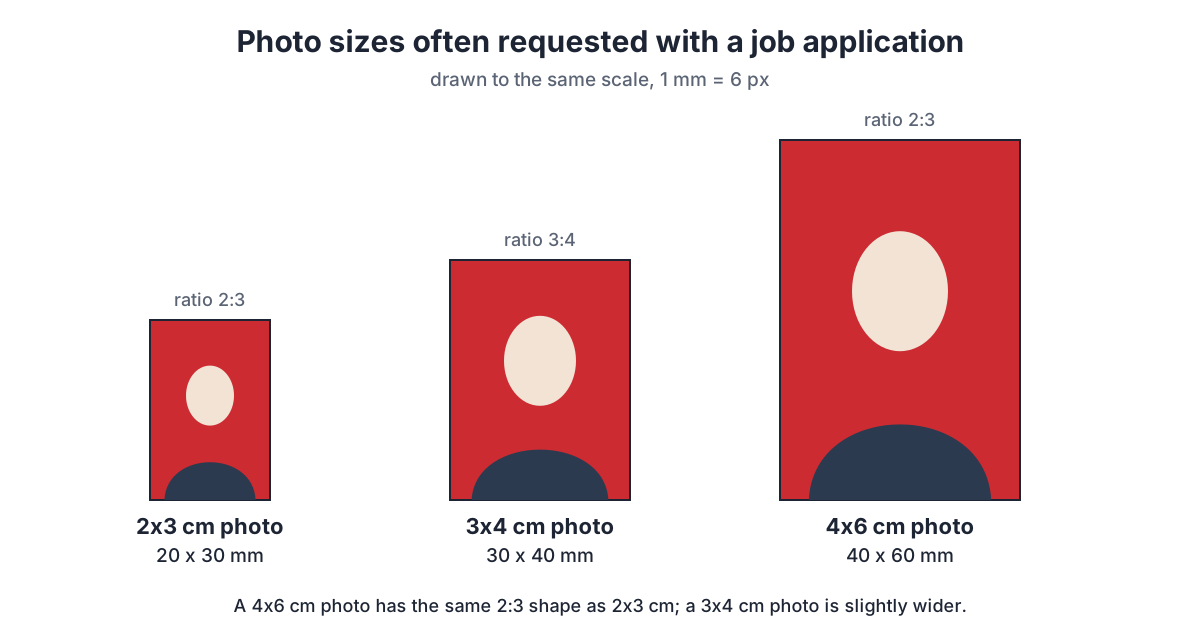
A size written as "3x4" means 3 cm wide and 4 cm tall. The first number is always the width, so an application photo is always portrait orientation. The 3x4 cm size is the one most often glued onto printed CVs and application forms. The larger 4x6 cm size is common for documents that are filed or displayed, such as staff ID cards and some administrative forms. The small 2x3 cm size appears on forms with a narrow photo box.
| Photo size | Millimetres | Inches | Ratio | Pixels at 300 dpi |
|---|---|---|---|---|
| 2x3 cm | 20 x 30 mm | 0.79 x 1.18 in | 2:3 | 236 x 354 px |
| 3x4 cm | 30 x 40 mm | 1.18 x 1.57 in | 3:4 | 354 x 472 px |
| 4x6 cm | 40 x 60 mm | 1.57 x 2.36 in | 2:3 | 472 x 709 px |
The inch values come from 1 inch = 25.4 mm, and the pixel values from pixels = mm / 25.4 x dpi. Notice that 4x6 cm has the same 2:3 shape as 2x3 cm, while 3x4 cm is slightly wider. One 2:3 crop can therefore be printed at either 2x3 or 4x6 cm without cropping again, but a 3:4 crop cannot be used directly as a 4x6. Each size has its own guide: 3x4 photo size, 4x6 photo size and 2x3 photo size.
Ready to try it? The tool is free and runs in your browser.
Open the ID photo toolHow many pixels does a job application photo need?
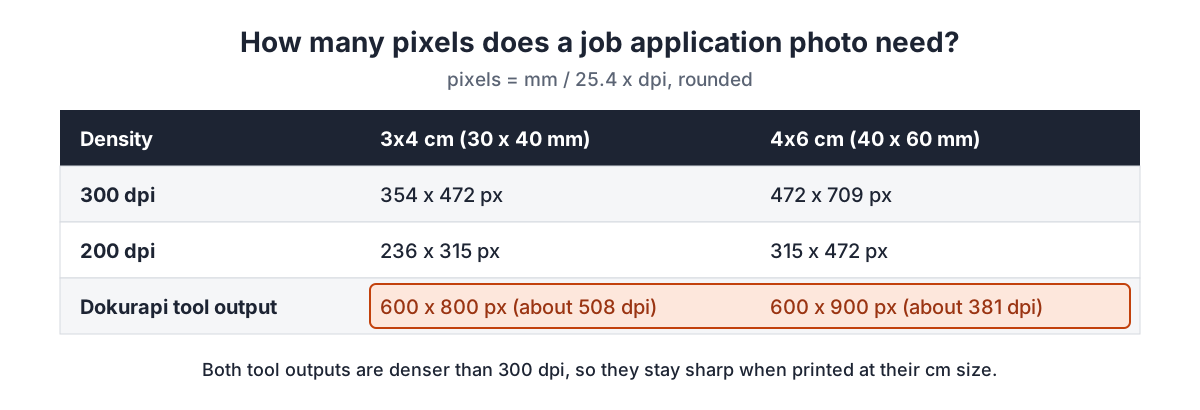
When you apply through a portal or by email, the photo file is judged by its pixels and file size, not by centimetres. Centimetres only matter once the photo is printed. As a rule of thumb, prints look sharp at around 300 dpi (dots per inch). At that density, a 3x4 cm photo needs at least 354 x 472 pixels and a 4x6 cm photo needs 472 x 709 pixels. At 200 dpi the numbers drop to 236 x 315 pixels for 3x4 and 315 x 472 pixels for 4x6.
The Dokurapi red background ID photo tool outputs a 600 x 800 pixel JPG for the 3:4 crop and a 600 x 900 pixel JPG for the 4:6 crop. Printed 3 cm wide, the 600 x 800 file has a density of about 508 dpi; printed 4 cm wide, the 600 x 900 file has about 381 dpi. Both are above 300 dpi, so they print cleanly at their cm size and stay light enough to upload.
If a posting asks for specific pixel dimensions, such as a minimum width and height, follow those numbers. If it only gives a maximum file size in KB, there is no need to shrink the pixels; compressing the JPG is enough. A photo that is too small, for example a screenshot of your gallery, can look blurry when a recruiter opens it on a large monitor.
Background colour: red, blue or white?
The background colour of an application photo is set by the employer, not by a universal rule. Many private-sector postings do not mention colour and accept any tidy plain background. Some ask for red or blue explicitly. In Indonesia, for example, the 2023 civil service (CPNS) FAQ from the national civil service agency asked for a red background, as summarised in our SSCASN upload requirements guide, and each agency's announcement remains the final word.
The Dokurapi ID photo tool offers two background colours: red and blue. White is not available yet, so if a posting asks for white, take the photo in front of a plain white wall and only crop and compress it. When red and blue are typically used is covered in the red background photo and blue background photo guides.
If the posting does not specify a colour, choose a neutral one and keep it consistent across every document. Do not mix a red-background photo on your CV with a blue-background photo on the form for the same application; a recruiter comparing files may think they were taken at different times. One photo session, one background, and every size derived from the same original file.
What to wear and how to pose in a job application photo
An application photo is a first impression, so it should look close to how you would dress for the role on a normal working day. A collared shirt, a neat blouse or a dark blazer is almost always safe. Avoid clothing in the same colour as the background you plan to use: a red shirt on a red background makes the shoulders blend into it, and automatic background separation becomes harder.
- Face the camera straight on, eyes open, neutral expression or a slight smile.
- Head and shoulders in the frame, with a little space above the head.
- Hair or headscarf tidy, not covering the eyebrows or eyes.
- No sunglasses, hats or masks unless the posting allows them.
- Light from the front or from a side window, with no hard shadow on the wall.
The rear camera of a phone is usually sharper than the front camera. Ask someone to take the photo from about one to two metres away with a little zoom, so your face is not stretched the way a close selfie stretches it. Take several shots and pick the one with the sharpest eyes before you make the ID photo.
How to make a job application photo in your browser
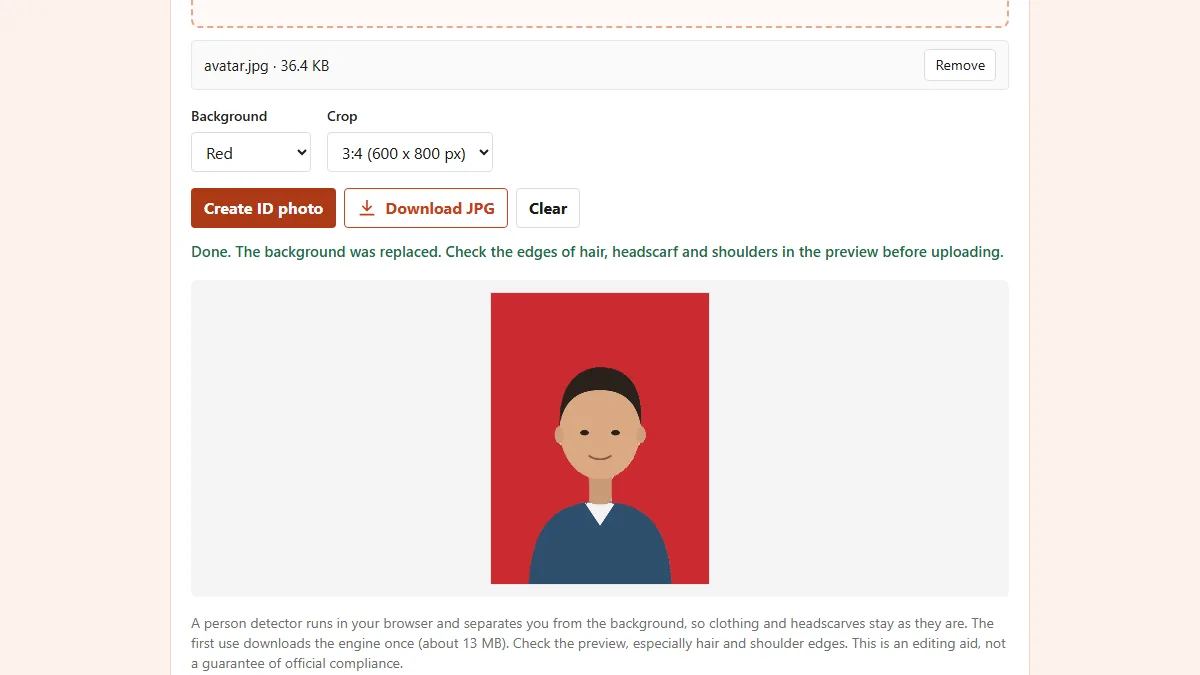
The Dokurapi ID photo tool separates the person from the background with a person detector that runs in your browser tab, fills in a red or blue background and crops to the ratio you choose. Files are not sent to a server. The first run downloads the detector once, so give it a moment on a slow connection.
- Open the red background or blue background ID photo tool.
- Choose one portrait photo or drag it onto the drop area.
- Under Background, pick Red or Blue to match the posting.
- Under Crop, pick 3:4 (600 x 800 px) for a 3x4 cm photo, or 4:6 (600 x 900 px) for 4x6 and 2x3 cm.
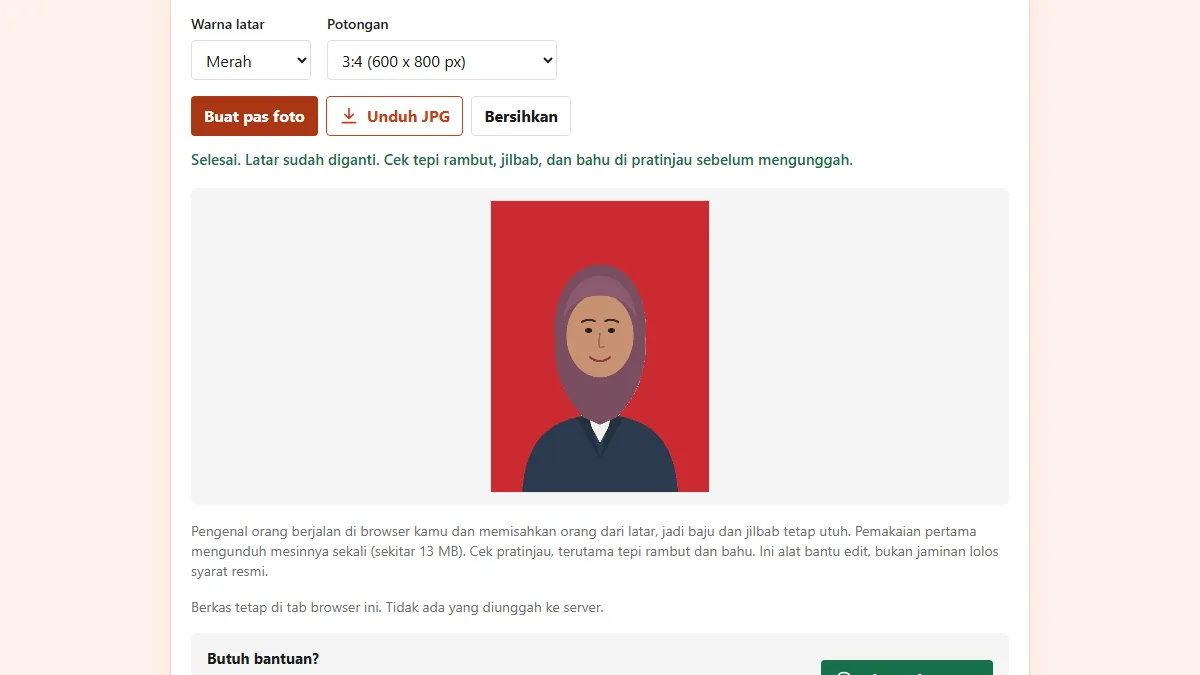
- Press Create ID photo and check the edges of hair, headscarf and shoulders in the preview.
- Press Download JPG. The result is a high-quality JPG you can compress if needed.
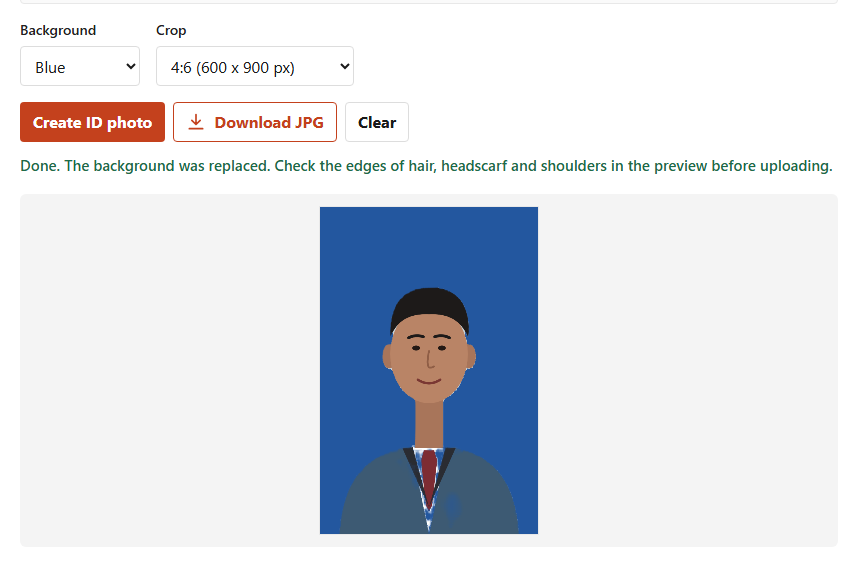
The "No crop" option keeps the whole frame and only scales down very large photos (longest side at most 1,600 pixels) so the detector stays fast. It is useful when a posting asks for a half-body photo rather than an ID photo. For a regular application, the 3:4 or 4:6 crop is safer because your face ends up centred automatically.
File size: compress the photo to the posted limit
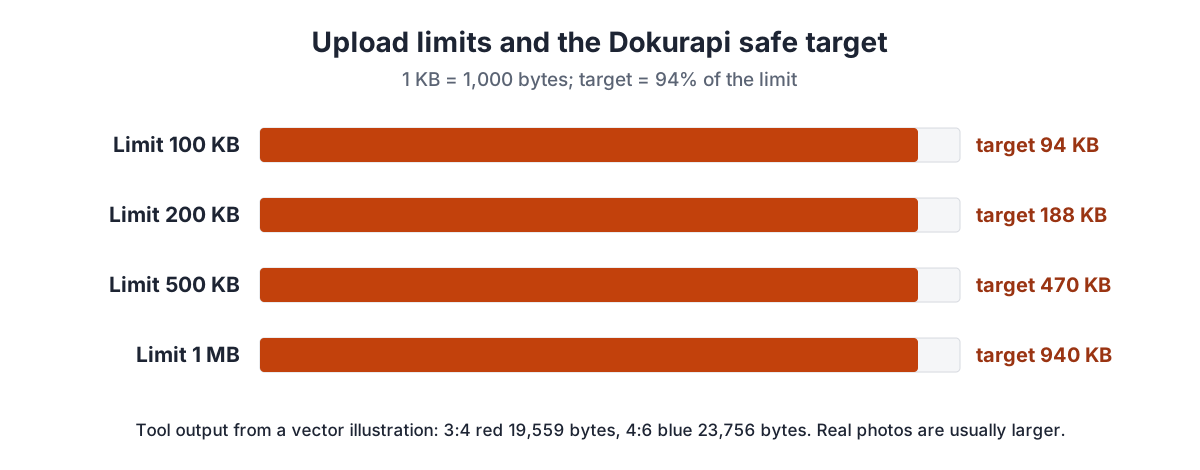
Upload limits for application photos vary widely, from 100 KB to several MB. The number is in the posting or next to the upload button. The ID photo tool output is usually small already: from the vector illustrations in our examples, the red 3:4 crop came out at 19,559 bytes and the blue 4:6 crop at 23,756 bytes. Real photos with fabric and hair detail are usually larger, so always check the size before uploading.
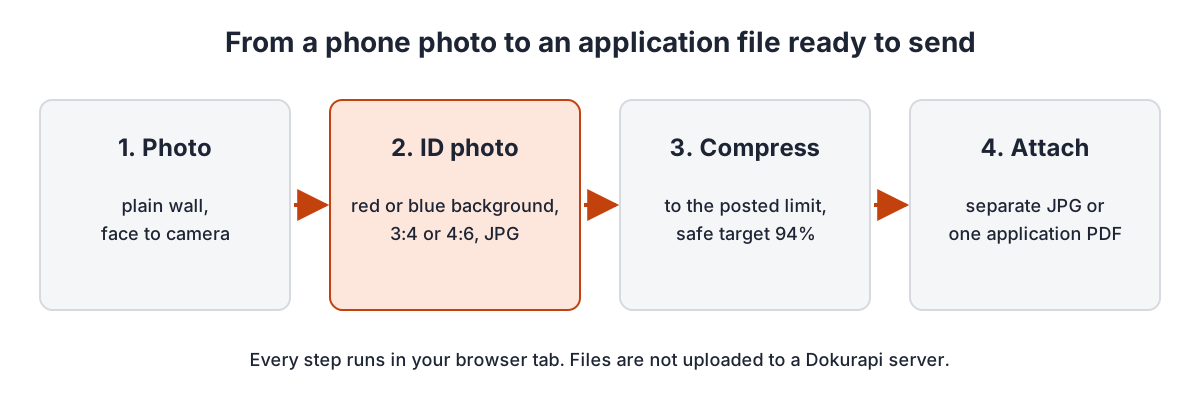
If the file is over the limit, open compress image to 200 KB or choose another target in the same tool: 100 KB, 200 KB, 500 KB, 1 MB, 2 MB or your own KB number. Dokurapi counts 1 KB as 1,000 bytes and aims for 94% of the limit, so a 200 KB target becomes about 188 KB. That margin keeps the file under the limit on portals that count 1 KB as 1,024 bytes. For very small limits use compress image to 100 KB; for generous ones, compress image to 500 KB keeps more detail.
Not sure how KB and MB relate? The 200 KB to MB guide explains the conversion. If a compressed file is still too large, compressed file still too big covers the usual causes and fixes.
Attaching the photo: separate JPG or inside one PDF
Two patterns show up in most postings. In the first, the form has its own upload field for the photo in JPG, separate from the CV and certificates. Upload the compressed JPG from the ID photo tool there. In the second, applicants send one PDF that contains the cover letter, CV, photo and other documents, usually by email or through a single upload field.
For the second pattern, turn the photo into a PDF page with photo to PDF. The A4 option centres the photo on an A4 page, while the no-crop option makes a page the size of the photo. Then combine it with your CV and other documents using merge PDF, and check the result with check PDF size. Page order for application bundles is covered in merge PDF for submissions.
Give the file a clear name such as photo-full-name.jpg so a recruiter can find it among hundreds of attachments. Avoid camera names like IMG_20261102.jpg. If you send by email, check the total attachment size, since many email services cap the size of a single message.
Applying through portals, email and printed files
Job postings reach applicants through company career sites, government portals, private job boards and plain email to HR. In Indonesia, for instance, the Ministry of Manpower runs the Karirhub portal for general vacancies and the civil service agency runs SSCASN for civil service selection. Each channel has its own forms and file limits, and those limits can change from one hiring round to the next. Do not reuse last year's numbers without checking the current announcement.
A habit that helps: keep one full-resolution original in an application folder, then make a copy for each posting (3x4 red, 4x6 blue, a 200 KB version, a version inside a PDF). That way you never compress a file that has already been compressed, which is what makes faces look blocky. The check file size before upload guide shows how to confirm the size before pressing submit.
All Dokurapi tools process files inside the browser tab; how that works and where its limits are is explained in how browser tools work. Dokurapi cannot promise that any portal will accept a file. What it can make sure of is that the size, format and dimensions match the numbers you chose.
Printing photos for a paper application
Some postings still ask for applications by post or delivered in person. For those, print the photos on photo paper and cut them out. On 4R photo paper (102 x 152 mm), 9 photos of 3x4 cm fit (3 columns by 3 rows) or 4 photos of 4x6 cm (2 by 2), with no cutting gap. On A4 paper with a 5 mm margin, 42 photos of 3x4 cm or 20 photos of 4x6 cm fit. A 2 mm cutting gap lowers those counts, so print a few spares.
When printing, set the print size in the printer dialog to 30 x 40 mm or 40 x 60 mm rather than "fit to page". If a print shop asks for the file, send the original JPG from the ID photo tool, not the version you compressed for a portal. Sheet counts and print settings are covered in more depth in the 3x4 photo size guide. Attach the photo in the top right corner of a printed CV or in the box on the form, and write your name on the back if asked.
Common mistakes with job application photos
Most problems with application photos are not about the wrong centimetre size. They come from a file that does not fit the form. These are the mistakes we see most often, with a way around each.
- Close-up selfies. The face looks stretched and the shoulders get cut off. Ask someone else to take the photo from further away.
- Busy background. Shelves or windows behind you make the background separation less clean. Stand in front of a plain wall.
- Clothes close to the background colour. The detector may treat part of the outfit as background. In the example above, small patches of the white shirt were recoloured, so always check the preview.
- Compressing again and again. Every JPG compression lowers quality. Always start from the original.
- Wrong format. A form that asks for JPG may reject PNG or HEIC. The Dokurapi ID photo tool always downloads a JPG.
- An old photo. Many postings ask for a recent photo. Take a new one if your appearance has changed a lot.
When everything is ready, open the file once more on a phone or laptop the way a recruiter will see it. If the face is clear, the background is even and the file size is under the limit, your job application photo is ready to send.
Frequently asked questions
What size is a photo for a job application?
How many pixels should a 3x4 cm application photo have?
Should a job application photo have a red or blue background?
What file size should an application photo be?
Can I use a selfie for a job application photo?
How do I put my photo into an application PDF?
Is my photo uploaded to a Dokurapi server?
How many 3x4 cm photos fit on 4R paper?
Sources
- Photo print sizes (4R 102 x 152 mm), Wikipedia
- Inch (1 inch = exactly 25.4 mm), Wikipedia
- Dots per inch, Wikipedia
- Paper size (A4 210 x 297 mm), Wikipedia
- Karirhub, job portal of the Indonesian Ministry of Manpower
- SSCASN, official Indonesian civil service selection portal (BKN)
Need help?Result not quite right, or unsure about a form rule? Ask Dokurapi support on WhatsApp. Please do not send personal documents in chat.
Chat on WhatsApp